
티스토리 뷰
[클라우드 네이티브] 18. Kafka 확장과 동시성 처리 환경에 따른 메시징 처리 Test
endingo 2025. 6. 16. 18:38싱글 파티션, 싱글 컨슈머 환경 테스트
멀티 파티션, 멀티 컨슈머 환경 테스트
# 싱글 파티션
1. 새로운 터미널에서 카프카 토픽을 실시간 모니터링
- 명령어
cd kafka
docker-compose exec kafka /bin/bash
- 컨슈머 시작
cd /bin
./kafka-console-consumer --bootstrap-server localhost:9092 --topic kafka.scaling --from-beginning

- 주문을 실행
http :8081/orders customerId=1000 productId=100 productName=TV qty=3 address=SEOUL

- 카프카 터미널 확인
카프카에서 실행되는 것을 볼 수 있다
docker-compose kafka

- 새로운 주문 실행
http :8081/orders customerId=2000 productId=100 productName=RADIO qty=3 address=PUSAN

- 카프카 터미널 확인

2. 배송지 정보를 수정(PUSAN > SEOUL) 하기
- 명령어
http PATCH :8081/orders/2 address=SEOUL

- Kafka topic 실시간 모니터링

3. 주문을 삭제하기
명령어
http DELETE :8081/orders/2


4. 데이터베이스를 조회하기
명령어
cd mysql
docker-compose exec -it master-server bash
mysql --user=root --password=1234
use my-database;
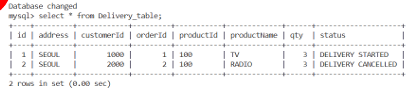
select * from Delivery_table;

- 배송 서비스 테이블에 최종 배송취소 상태값 확인하기
cd kafka
docker-compose exec kafka /bin/bash
cd /bin
./kafka-topics --bootstrap-server 127.0.0.1:9092 --alter --topic kafka.scaling -partitions 2
./kafka-topics --bootstrap-server 127.0.0.1:9092 --topic kafka.scaling --describe

# 멀티 파티션
1. Consumer 서비스 실행으로 메시지 수신 준비하기
cd delivery-2nd
mvn clean spring-boot:run

'클라우드 > 클라우드 네이티브 애플리케이션' 카테고리의 다른 글
| [클라우드 네이티브] 20. Kafka 확장과 동시성 처리순서가 보장되는 메시징 (0) | 2025.06.16 |
|---|---|
| [클라우드 네이티브] 19. Kafka 확장과 동시성 처리순서가 지켜지지 않는 메시징 (0) | 2025.06.16 |
| [클라우드 네이티브] 17. Kafka 확장과 동시성 처리 주문, 배송서비스 실행 (0) | 2025.06.13 |
| [클라우드 네이티브] 16. Kafka 동적 확장 파티션 확장 (2) | 2025.06.13 |
| [클라우드 네이티브] 15. Kafka 동적 확장 order 서비스를 통해 주문 요청 (5) | 2025.06.13 |